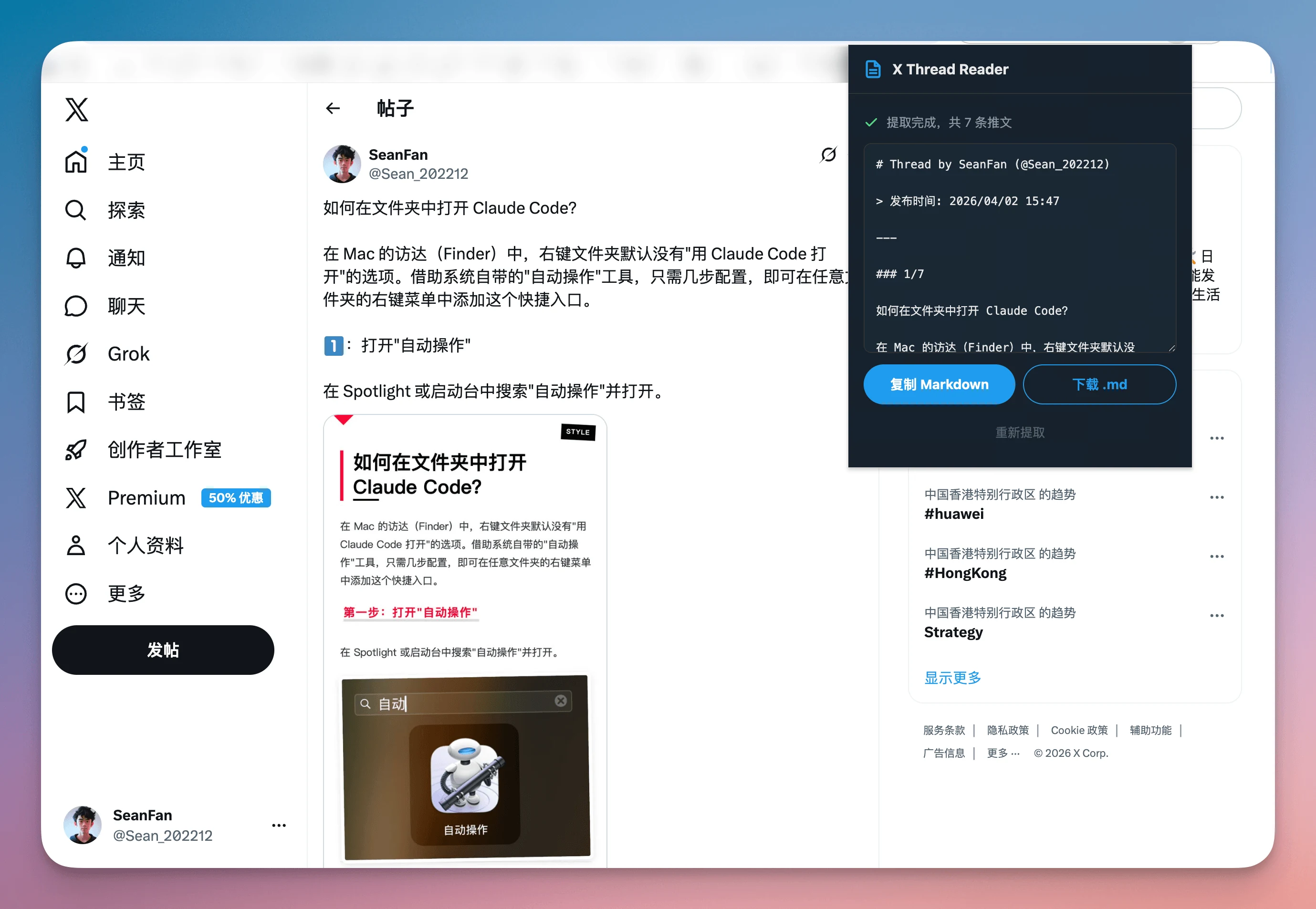
The extension auto-scrolls and keeps collecting posts so long threads do not get cut off halfway.
Turn sprawling threads into clean Markdown archives.
X Thread Reader helps you capture a complete X/Twitter thread, keep the image links, and export everything into one tidy Markdown file. No account required. No cloud sync. Just a faster way to save the posts worth keeping.
A simpler way to save Twitter threads that actually matter.
Great threads are often buried inside fast-moving timelines. X Thread Reader is built for people who want to keep the useful ones in a format that still feels readable later.
Output is organized into Markdown, making it easy to paste into Obsidian, Notion, docs, or a repo.
All extraction happens inside the browser. The site and extension do not need your thread data on a server.
Built for the exact job: export a Twitter thread to Markdown.
The product is deliberately narrow. It does one thing well: read a thread, gather the posts, and turn the result into a portable text archive.
Detects thread pages automatically
Open any post URL with `/status/` and the extension knows when it should start working.
Captures long threads end to end
Auto-scrolling helps uncover replies and continuation posts so your archive stays complete.
Preserves image links
Image URLs are included in the Markdown output, which is useful for research or content reuse.
Copies or downloads instantly
When extraction is done, copy to the clipboard or save as a `.md` file for later reading.
Readable output beats screenshots every time.
If people search for “save Twitter thread” or “export X thread with images”, they usually want a format that can survive outside the timeline. Markdown is that format.
Markdown that stays useful after the timeline is gone
Exported threads stay portable. You can add them to your personal wiki, your writing notes, your internal docs, or a plain text archive without reformatting everything by hand.
For users who search “twitter thread reader” or “thread to markdown chrome extension”, that is the main promise: capture first, reuse later.
# Example thread title
- Author: @example
- Source: x.com/.../status/123
## Post 1
Opening idea.
## Post 2
Supporting argument.

Privacy that is easy to explain
X Thread Reader runs locally, keeps processing in the browser, and does not rely on a dashboard or a remote parser. That makes the value proposition cleaner and the privacy story stronger.
How to export a Twitter thread in three quick steps.
The workflow is intentionally short so the extension feels like a reading tool, not a complicated platform.
Open a post on X or Twitter
Visit any thread page on `x.com` or `twitter.com` where the URL contains `/status/`.
Click the extension in your toolbar
The popup starts extraction, scrolls when needed, and shows progress while it collects the thread.
Copy or download the Markdown file
Move the result straight into your notes, archive, writing workflow, or research folder.
See the full extraction flow in one short clip.
This recording shows the actual product interaction: opening the thread, triggering the popup, waiting for extraction, and getting the final Markdown actions. It makes the promise of the tool feel concrete immediately.
The practical details people care about before installing.
Search traffic only matters if the page answers the real pre-install questions clearly: compatibility, privacy, output format, and installation path.
Does it work on both x.com and twitter.com?
Yes. The extension supports thread pages on both domains as long as they use the standard status URL format.
Does it upload my saved thread anywhere?
No. Extraction and formatting happen in the browser, and the exported Markdown stays with you.
Can it keep image references?
Yes. Image links are included in the Markdown output so the archive is more complete than plain text.
Where can I install it?
The Chrome Web Store listing is coming soon. For now, the source and setup guide are available on GitHub.
Give the extension a real front door before you ship the store listing.
This site is ready to act as the official homepage for X Thread Reader. Publish it on Vercel, connect your domain later, and point your Chrome Web Store listing back here when it goes live.